


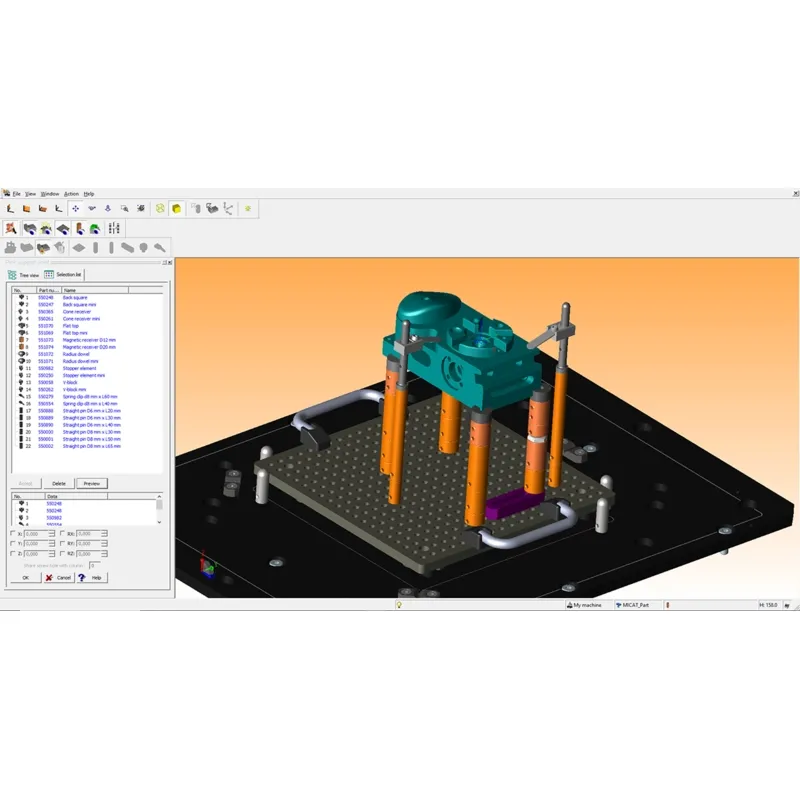
- Модель:FixtureBuilder Software
- Артикул:FixtureBuilder Software
- 50
- Beschreibung:Die Software FixtureBuilder ermöglicht das Importieren der Dateiformate ACIS (*.sat), IGES (*.igs) und STEP (*.stp).Sie verfügt über die Exportfunktionen HOOPS (*.hsf), Autodesk (*.dwf), 3D-PDF (*.pdf) und ACIS (*.sat). FixtureBuilder, integriert in die Mitutoyo Messsoftware MCOSMOS, oder als Stand-Alone Version. FixtureBuilder erlaubt die Bearbeitung in allen Importformaten von MCOSMOS. Die konstruierte Vorrichtung kann, auch komplett mit Bauteil, in die Messsoftware importiert werden und steht so für die Offline-Programmierung des Koordinatenmessgerätes zur Verfügung. Der Import ist auch mit kompatiblen KMG-Software von Drittanbietern möglich.Zum Download:https://mitutoyo.eu/download_file/force/d29a8664-2a7b-4fd1-ae0d-07a07cf79399/443Die On- oder Offline-Teileprogrammierung, z. B. mit dem MiCAT Planner, wird noch einfacher, indem die Spannmittel- und Wersktückdaten direkt in die Software importiert werden.Zum reellen Aufbau der vom FixtureBuilder erstellten Vorrichtung steht dem Anwender eine Stückliste mit Aufbauanleitung in verschiedenen Ausgabeformaten zur Verfügung. Besonders praktisch ist die 3D-Funktion im PDF-Format, sie erlaubt es, das Modell der Vorrichtung im PDF-Dokument beliebig in seiner Ansicht zu verändern. So ist es möglich, die virtuelle Konstruktion aus allen Ansichten und Lagen zu betrachten.Import der Dateiformate ACIS (*.sat) IGES (*.igs) STEP (*.stp) Sichern der Dokumentation in Dateiformate PDF (3D Option) HTML CSV Export des Aufspannsystems in Dateiformate HOOPS (.hsf) 3D PDF (.pdf) ACIS (.sat) Zum Download: FixtureBuilder
FixtureBuilder software allows data to be imported in Acis (*.sat), Iges (*.igs) and Step (*.stp) formats. The export functions it offers include Hoops file (*.hsf), A, 3d PDF (*.pdf) and Acis Files (*.sat).
Available integrated in Mitutoyo’s MCOSMOS CMM software, or as a free standalone version, FixtureBuilder allows data to be processed in all MCOSMOS import formats. The fixture design can be imported into the measuring software, either on its own or complete with component, and thus be used for offline programming of the coordinate measuring machine. The import works too with any compatible 3rd party CMM software.
Online part programming, for e.g., with part program generating software MiCAT Planner, is even easier by importing the fixture and part data directly into the software.
A parts list report with assembly instructions is available in various output formats for the assembly of the real fixture created in FixtureBuilder. The 3D function in PDF format is especially practical as it allows limitless variations on the view of the fixture model in the PDF document. The virtual design can therefore be examined from all possible views and positions.
Import data in
Save fixture report in
Save fixture data in
You can Download the FixtureBuilder here: Get FixtureBuilder
Available integrated in Mitutoyo’s MCOSMOS CMM software, or as a free standalone version, FixtureBuilder allows data to be processed in all MCOSMOS import formats. The fixture design can be imported into the measuring software, either on its own or complete with component, and thus be used for offline programming of the coordinate measuring machine. The import works too with any compatible 3rd party CMM software.
Online part programming, for e.g., with part program generating software MiCAT Planner, is even easier by importing the fixture and part data directly into the software.
A parts list report with assembly instructions is available in various output formats for the assembly of the real fixture created in FixtureBuilder. The 3D function in PDF format is especially practical as it allows limitless variations on the view of the fixture model in the PDF document. The virtual design can therefore be examined from all possible views and positions.
Import data in
- Acis (*.sat) file format
- Iges (*.igs) file format
- Step (*.stp) file format
Save fixture report in
- PDF file format (3D option)
- HTML file format
- CSV file format
Save fixture data in
- HOOPS (.hsf) file format
- 3D PDF (.pdf) file format
- ACIS (.sat) file format
You can Download the FixtureBuilder here: Get FixtureBuilder